Showing posts with label speaking. Show all posts
Showing posts with label speaking. Show all posts
Create Your Own English Comic Strip
The phrases and expressions used in written English are often different from those that would be used in spoken English, so remembering spoken English phrases is very important.
 Today we will look at a fun way you can use spoken phrases to create comic strips using the Make Belief Comix website. You can use these either to remind your self of any new phrases you are learning, or just to enjoy creating your own comic strip.
Task:
I hope you enjoy this activity. Here a some more activities that use cartoons.
Related links for teachers:
Nik Peachey
 Today we will look at a fun way you can use spoken phrases to create comic strips using the Make Belief Comix website. You can use these either to remind your self of any new phrases you are learning, or just to enjoy creating your own comic strip.
Task:
- Go to: http://www.makebeliefscomix.com and click on 'Enter Here' below the comic strip.
- You will then be able to see the comic creator. Think of some spoken phrases that you have learned recently. Think about how they would be used in conversation and how the people you are talking to might respond.
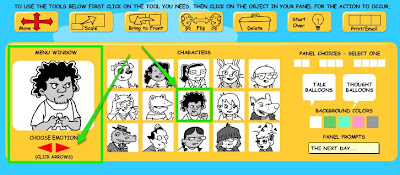
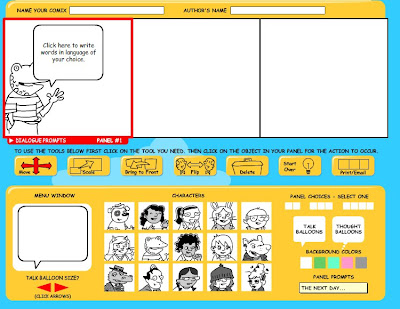
- Now create a comic strip using the phrases and making them part of the dialogue. It's simple to make a comic strip. You just click on the first character you want to use, then scroll through different emotions that you would like them to have.

- Once you have the one you want, just click on the person and they will appear in the comic strip. You can drag the person to the position you want them. Add other characters and text balloons for your dialogue.

- When you have finished you can print up or email the comic strip to yourself and keep it as a reminder.
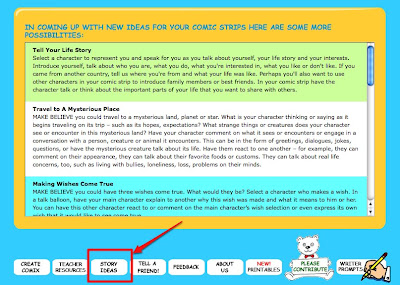
 If you enjoy this activity, there are also some story ideas that you could try. Try the first one 'Tell your life story'. This is a nice way to tell people about yourself.


I hope you enjoy this activity. Here a some more activities that use cartoons.
Related links for teachers:
- Dfilm - Dvolver Adds Embed Code
- Text to Speech Movies for EFL ESL
- Great Collection of Short Films
- Great Source of Animated Movies
- Text to Speech for EFL ESL Materials
- Creating audio-visual monologues
- Make you own animated movies
- Developing screencast tutorials
Nik Peachey
Send a Thanks Giving Message
With the US holiday of Thanks Giving approaching on November 27th I thought that today's activity could be connected and you could learn how to send a Thanks Giving video massage to any of your friends from the US or anyone else you would like to share thanks with.
To do this activity you will need a WebCam to record your video message. All you have to do to create the message is to visit the Bubble Joy website, choose a card design for your message, and then record the message.
There are a few different card designs to choose from.
Task:
Related links for teachers:
Nik Peachey
To do this activity you will need a WebCam to record your video message. All you have to do to create the message is to visit the Bubble Joy website, choose a card design for your message, and then record the message.
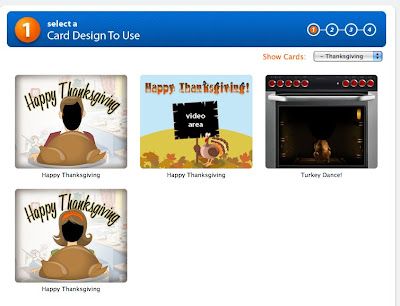
There are a few different card designs to choose from.
Task:
- Before you send a Thanks Giving message perhaps you'd like to find out a bit more about the holiday and what it commemorates. You can find out more about it here on Wikipedia: Thanks Giving US
- You should then decide what you want to say in your message. Here are some possible messages that you could choose from.
* Poems
* Quote
* Joke
- Once you have decided on your message, got to the Bubble Joy Thanks Giving greetings and choose the card design for your message.
- Once you have chosen the card design, click on 'Yes, T0 Continue'. You should then see a message asking for access to your camera. You'll need to click on 'Allow'. If the player settings window doesn't appear , then right click on the screen and select 'Settings' to make it appear.
 You should then see yourself in the video window. Click on 'Record' and start to say your message. You only have 60 seconds. You can review your message and try as many times as you like until you get the message right.
- Once you have finished recording the message click on 'Yes' and you will be taken to an email form.
- Add your email address and the address of the person you want to send the message to. They will then be sent a link to your message.
Related links for teachers:
- Great WebCam Software
- Things You Can Do With Your WebCam 1
- 12 Second Video Clips for EFL ESL
- Sending Bubble Joy to your EFL / ESL Students
- Microblogging for EFL with Plurk
- Great Video Commenting Tool
- Video conferencing for EFL
Nik Peachey
Learn Film Scripts
Today's activity combines three different websites to help you improve both your listening and the speed of your reading (and speaking if you want to try that too).
The activity uses a small text playing program called Zap Reader. You simply paste or type in a text and it will play the text for you word by word as you read. You can adjust the speed to make it go faster or slower.
 The second site we are going to use is Colin's Movie Monologue page. This site has a huge collection of speeches from the scripts of popular films.
 Lastly, to get some examples for you off what the speeches should sound like, we are going to use YouTube.
 Task:
Task:


Here is the video of the text '10 Things I Hate About You'.
If you enjoy this activity find some more monologues from your favourite films and try to Zap read them.
Come back tomorrow for more EFL ESL activities.
Related links for teachers:
Nik Peachey
The activity uses a small text playing program called Zap Reader. You simply paste or type in a text and it will play the text for you word by word as you read. You can adjust the speed to make it go faster or slower.
 The second site we are going to use is Colin's Movie Monologue page. This site has a huge collection of speeches from the scripts of popular films.
 Lastly, to get some examples for you off what the speeches should sound like, we are going to use YouTube.
 Task:
Task:- Go to: Colin's Movie Monologues and choose a monologue from a film that you know or like.
- I've chosen one called '10 Things I Hate about You' I chose it because it was the first one on the page. You can find the text here: http://tinyurl.com/6lxvkv or choose your own text. Copy the text.

- Next go to http://www.zapreader.com/reader/ and paste your text into the field. Then click on 'ZAP it'.
The text reader will appear. Change the text speed from 300 to 100 and then click play. Each word from the text will appear. Try to read through the text (you could also read out loud) as thee words appear.


- If you want to hear what the text should sound like then go to YouTube and search for the video of the monologue.
Here is the video of the text '10 Things I Hate About You'.
- Listen to the text and then try to read it again. Gradually increase the speed each time and try to get up to 200 (words per minute)
If you enjoy this activity find some more monologues from your favourite films and try to Zap read them.
Come back tomorrow for more EFL ESL activities.
Related links for teachers:
- Prompting reading speeds
- Interactive multiple choice activities
- Picture phrases
- Learning through karaoke!
Nik Peachey
Create a Video Vocabulary Record
Remembering new vocabulary can be a challenge so to make it easier you can record a 12 second video for each new word you learn. You can do this quite easily using a webcam and a free website called 12 Seconds TV.
Creating the video is easy. You just register on the site, log in and then click to allow the site access to your webcam and microphone. Then you can record and publish a simple 12 second video clip. Look at the image below to see how to do this.
 Each 12 second video clip you create is published to your own TV channel so you can watch them all when ever you want, or share them with your friends.
This is waht a channel looks like. You can subscribe to the channels of other users and follow what they are doing.

Task:
Headache on 12seconds.tv
If you've enjoyed this activity the why not record some more of your vocabulary words.
Please also post a link to your channel in the comments and then we can share all of our new words together.
Hope to see you back tomorrow for more Daily English Activities to help develop your English.
Related links for teachers:
Nik Peachey
Creating the video is easy. You just register on the site, log in and then click to allow the site access to your webcam and microphone. Then you can record and publish a simple 12 second video clip. Look at the image below to see how to do this.
 Each 12 second video clip you create is published to your own TV channel so you can watch them all when ever you want, or share them with your friends.
This is waht a channel looks like. You can subscribe to the channels of other users and follow what they are doing.

Task:
- Go to http://12seconds.tv register and log in
- Write your new word on a sheet of white paper using a thick pen.
- Think of an example sentence to accompany the word.
- Sit in front of your camera hold up the paper and presss record.
- Say the new word and then the example sentence. You could also say the same word in your own first language too.
- Post the word to you 12 Second TV channel.
Headache on 12seconds.tv
If you've enjoyed this activity the why not record some more of your vocabulary words.
Please also post a link to your channel in the comments and then we can share all of our new words together.
Hope to see you back tomorrow for more Daily English Activities to help develop your English.
Related links for teachers:
- 12 Second Video Clips for EFL ESL
- Sending Bubble Joy to your EFL / ESL Students
- Microblogging for EFL with Plurk
- Great Video Commenting Tool
- Video conferencing for EFL
- Send Free Video Messages
Nik Peachey
Send Your Friends an English Video Message
Everybody likes to get surprise messages, so why not spread a little joy to the world and send your friends some video messages in English. To do this you'll need to have a webcam attached to your computer.

Task:


Be sure to send your message in English. You can send as many messages as you like. It's all good practice for your speaking. Try to send a new one each day.
I hope you enjoy this activity. Come back tomorrow for more EFL ESL activities to improve your English.
Best
Nik Peachey
Related links for teachers:

Task:
- Go to: http://www.bubblejoy.com and click on get started
You then need to select an image for your card. There are lots to choose from. Try to choose one which suits your message.

Once you've selected the type of card you want to send you'll need to allow the site to access your camera and microphone.


- You should then be able to record a 60 second message. Don't worry if you get the message wrong you can record it again as many times as you like until you get it right.
- Then just fill in the form with your email address and the email of the person you want to send it to and go to the bottom of the page and click on 'Send'.

Be sure to send your message in English. You can send as many messages as you like. It's all good practice for your speaking. Try to send a new one each day.
I hope you enjoy this activity. Come back tomorrow for more EFL ESL activities to improve your English.
Best
Nik Peachey
Related links for teachers:
Record Yourself Reading a Poem
Reading poetry can help your to develop your reading skills as well as your speaking and pronunciation skills. This can be especially useful if you record yourself and listen.
You can do this in a fun way using a simple free software program called Flipz TV. You just download the free program, install it on your computer and then you can record yourself and created an animated talking head to send to your friends or put on your website.
You can find a list of poems at the Poetry 180 website
Task:

If you post your poem to your blog, then be sure to send us a link.
You can use this tool for recordinbg other texts too. It doesn't just have to be a poem.
Hope you enjoy this activity and come back for more ESL EFL activities tomorrow.
Best
Nik Peachey
You can do this in a fun way using a simple free software program called Flipz TV. You just download the free program, install it on your computer and then you can record yourself and created an animated talking head to send to your friends or put on your website.
You can find a list of poems at the Poetry 180 website
Task:
- Go to: http://www.flipz.tv/ and go to 'Downoad' to download the free software.
- Install the software on your computer (PC only. Sorry MAC users)
- Find a suitable poem that you want to read from the Poetry 180 website and prctice saying the poem out load.
- Copy the text of the poem and use it to create your animated talking head like the one above.
- This video shows you how to record the audio FlipzTV Tutorial

- Listen to your peom once you have recorded it. You might want to try it 3 or even 4 times to get it right.
- When you are finished you can save the file to your computer and watch your talking head, like the one above.
If you post your poem to your blog, then be sure to send us a link.
You can use this tool for recordinbg other texts too. It doesn't just have to be a poem.
Hope you enjoy this activity and come back for more ESL EFL activities tomorrow.
Best
Nik Peachey
Subscribe to:
Posts (Atom)