Showing posts with label listening. Show all posts
Showing posts with label listening. Show all posts
Improve your English through film clips
When learning English it's important that you hear as many different accents and types of voices from different ages of speaker so that you are able to understand English wherever you go. This activity gives you lots of opportunity to practice your listening skills and broaden your understanding of English speakers.

This is a simple and enjoyable activity to test your listing skills. It's based around video clips from YouTube with interaction built in through the VoScreen website.
Task:
Go to the Voscreen website at: http://www.voscreen.com/
You can sign up for free, but you don't have to, just click on 'Start as Guest'.
 Then select your first language and click on save.

Next you will see the first video clip. Play the clip and listen to the short piece of text. You can play the clip a number of times if you aren't sure you understand it. If you still aren't sure you can click 'Show me the script' to see the script.
 You then have to choose the correct translation. You have 15 seconds to make your choice.
 You score points for guessing correctly and you can see your score above the video clip.
 You can play for as long as you wish, but coming back to http://www.voscreen.com/ regularly for a few minutes each day should really help to improve your listing skills.
I hope you enjoy this activity.
Related links for teachers:
Nik Peachey
This is a simple and enjoyable activity to test your listing skills. It's based around video clips from YouTube with interaction built in through the VoScreen website.
Task:
Go to the Voscreen website at: http://www.voscreen.com/
You can sign up for free, but you don't have to, just click on 'Start as Guest'.
Next you will see the first video clip. Play the clip and listen to the short piece of text. You can play the clip a number of times if you aren't sure you understand it. If you still aren't sure you can click 'Show me the script' to see the script.
I hope you enjoy this activity.
Related links for teachers:
- 100 resources for exploiting online video
- Tall Stories as Digital Narrative
- Engage Students with Flipped Video Tasks
- Visualize sentences with video clips
- Create a Web Based Song Activity in Minutes
Nik Peachey
Train yourself to hear song lyrics
Listening to songs is a great way to learn a language. It's easy to listen to a song many times, especially if it's one that you enjoy and this can really help with your listening and pronunciation.
 This activity is based around the Lyrics Training website. The site helps you to listen to and understand songs.
Task:
Go to: http://www.lyricstraining.com here you can search for a song that you like or select on from the home page. Once you click on a song it will start to play, you can then select your level.

I hope you find this useful. Here you can find more song based EFL / ESL activities.
Related links for teachers:
Best
Nik Peachey
 This activity is based around the Lyrics Training website. The site helps you to listen to and understand songs.
Task:
Go to: http://www.lyricstraining.com here you can search for a song that you like or select on from the home page. Once you click on a song it will start to play, you can then select your level.
 You then see some of the words of the song with some gaps. The song will stop so that you can write in the missing words.

 You can also select your own language so that you can see a translation of the lyrics in your own language.

 Click on 'Help' to see all the instructions.


I hope you find this useful. Here you can find more song based EFL / ESL activities.
Related links for teachers:
- Using Movie Soundtracks in the EFL ESL Classroom
- Animated Music Videos for EFL
- Get the Stars to Sing Your Students' Words
- Can Music Aid Memory of Text?
- Transcribed Videos for EFL ESL
- Karaoke with a Social Network
- Another Great New Karaoke Site
Best
Nik Peachey
Write a Blues Song in English
Listening to music and songs is a great way to improve your listening skills, vocabulary and pronunciation.
 In this activity you create a Blues song and then listen to it. You will then listen to some more Blues music and do some listening dictation.
Task:
Go to: http://www.thebluesmaker.com/ and click on 'Start it Right Away'.
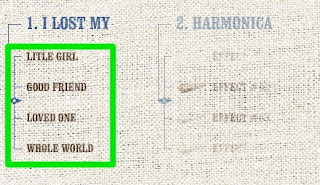
 There are ten steps to creating your song. In step 1 complete the first line of the song. The song starts " I lost my .." and you choose the end of the line by clicking on one of the 4 choices.
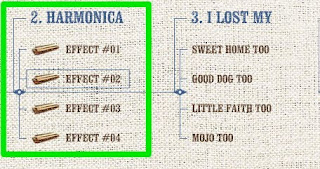
 Then move on to step 2 and choose the harmonica sound you want next. Once you have the sound you like, continue and choose the next line of the song.
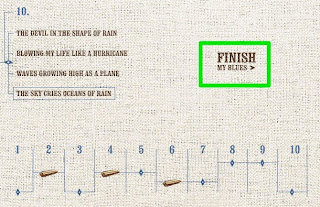
 Continue through all the steps until you get to step 10, then click on 'Finish my Blues'. Wait a few moments and you will be able to hear your song.
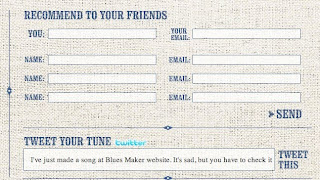
 Once the song has finished playing, you can share it by sending it to your friends. Just add email addresses and click send.
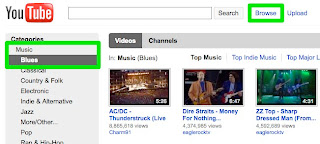
If you enjoy this song, you can find more Blues music on YouTube by going to 'Browse', 'Music' and 'Blues' (or click here: Blues).
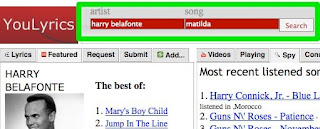
 Try to find a song you like and write down the lyrics / words of the song. Once you think you have written down all the lyrics, go to: http://2hats.net/yl/ Here you will be able to search for the video and the correct lyrics to check your work.
I hope you enjoy this activity and the music you listen to and create.
Best
Nik Peachey
 In this activity you create a Blues song and then listen to it. You will then listen to some more Blues music and do some listening dictation.
Task:
Go to: http://www.thebluesmaker.com/ and click on 'Start it Right Away'.
 There are ten steps to creating your song. In step 1 complete the first line of the song. The song starts " I lost my .." and you choose the end of the line by clicking on one of the 4 choices.
 Then move on to step 2 and choose the harmonica sound you want next. Once you have the sound you like, continue and choose the next line of the song.
 Continue through all the steps until you get to step 10, then click on 'Finish my Blues'. Wait a few moments and you will be able to hear your song.
 Once the song has finished playing, you can share it by sending it to your friends. Just add email addresses and click send.
If you enjoy this song, you can find more Blues music on YouTube by going to 'Browse', 'Music' and 'Blues' (or click here: Blues).
 Try to find a song you like and write down the lyrics / words of the song. Once you think you have written down all the lyrics, go to: http://2hats.net/yl/ Here you will be able to search for the video and the correct lyrics to check your work.
I hope you enjoy this activity and the music you listen to and create.
- Here you can find all the song related activities for EFL and ESL students
- Using Movie Soundtracks in the EFL ESL Classroom
- Animated Music Videos for EFL
- Get the Stars to Sing Your Students' Words
- Can Music Aid Memory of Text?
- Transcribed Videos for EFL ESL
- Karaoke with a Social Network
- Another Great New Karaoke Site
Best
Nik Peachey
Learn to Put Your Make Up on in English
YouTube offers you so many opportunities to learn English and also to learn how to do new things, learn how to do things better or teach others how to do things.
 In today's activity we'll look at some 'home' produced YouTube channels and learn a bit more about how to use make up and other cosmetics and develop your vocabulary in this area. We'll also look at how you can enter into a dialogue with the people who create the videos.
Task:

One of the great things about people who produce these kinds of videos is that they welcome communication with the people who watch their videos, so you can either go to their channel on YouTube and send them a comment or question or you can follow them on Twitter and see what they have to say and ask them questions.
Here you can find more video based activities for EFL ESL students
Related links for teachers:
Nik Peachey
 In today's activity we'll look at some 'home' produced YouTube channels and learn a bit more about how to use make up and other cosmetics and develop your vocabulary in this area. We'll also look at how you can enter into a dialogue with the people who create the videos.
Task:
- You are going to watch 3 short videos showing you how to apply make up. The first video is by Andrea and has no words, just text and images. Pause the video to make notes of any new words you see in the text.
- Now look at the new words you noted down and check to find a definition for them on this site: Make Up USA Vocabulary.
- Just click on the word to the left of the screen and you will find images of the kinds of products in the video.

- Now that you have a bit more vocabulary, you can watch this second video and listen as Michelle Phan describes how she puts on her make up.
- The vocabulary in these videos and the range of accents can be very challenging, but if you watch and listen to a number of different ones you will find they become easier to understand, and if you do have a problem with understanding some of the things that they are saying or doing, remember that you can leave a comment or ask a question by going to the video on YouTube.
- Here's one more video for you to watch. In this one Elle describes the make up used in the 'Blockbuster' movie 'Twilight'.
One of the great things about people who produce these kinds of videos is that they welcome communication with the people who watch their videos, so you can either go to their channel on YouTube and send them a comment or question or you can follow them on Twitter and see what they have to say and ask them questions.
- You can find Andrea's YouTube channel at: Andrea's Choice and follow her on Twitter at: Andrea's Choice
- You can find Michelle's YouTube Channel at: Michelle Phan and follow her on Twitter at: Michelle Phan
- You can find Elle's YouTube channel at: AllThatGlitters and follow her on twitter at: AllThatGlitters
Here you can find more video based activities for EFL ESL students
Related links for teachers:
- Create an ESL EFL Video Quiz
- Crazy Comparatives & Superlatives
- 12 Second Video Clips for EFL ESL
- Create Image Books
- Sending Bubble Joy to your EFL / ESL Students
- Microblogging for EFL with Plurk
- Great Video Commenting Tool
- 20 WebCam Activities for EFL ESL Students
- Online Video: For Language Development
- Online Video: As Knowledge Resource
- Online Video: Authentic Genres
- Free Educational TV Channels
- News Videos for EFL ESL Materials Design
Nik Peachey
Learn from and Create Animated Music Videos
Learning English from songs lyrics and music is a great way to study. In today's activity you are going to be able to watch and enjoy some simple 'stop motion' animated music videos and then find out how to create your own.
 The videos for you to watch come from two sources; Music and Muffins and SereneRhapsody and you can find more examples on their YouTube Channels
Task:
Related links for teachers:
Nik Peachey
 The videos for you to watch come from two sources; Music and Muffins and SereneRhapsody and you can find more examples on their YouTube Channels
Task:
- For the first part of this task, you can simple watch and enjoy two short music videos and just decide which video you like the most.
- This one is "You Could Be Happy" and the music is by Snow Patrol
- This one is called "Rain drops" and the music is by Regina Spector
- You can find more videos like this at Music and Muffins and Serene Rhapsody
- Once you have chosen the video you like best, think about how the images illustrate the story of the song.
- Try to think of a song that you like and the story behind the song.
- Find the lyrics for the song at: http://www.lyrics.com/ and copy each line of the lyrics onto a sheet of paper.
- Put the sheets of paper in order and then do a simple sketch on each sheet of paper to illustrate the line from the song.
- Now using a simple digital camera you can create your own 'stop motion' video of the song.
- Here you can find step by step instructions showing how this is done.
- Here you can watch a video of how to make stop motion videos
- Once you have create your video you will need to add the sound track too. This is a great way to enjoy music and develop your English.
- Here you can find 20 + more video activities for EFL ESL students
Related links for teachers:
- Create an ESL EFL Video Quiz
- Crazy Comparatives & Superlatives
- 12 Second Video Clips for EFL ESL
- Create Image Books
- Sending Bubble Joy to your EFL / ESL Students
- Microblogging for EFL with Plurk
- Great Video Commenting Tool
- 20 WebCam Activities for EFL ESL Students
- Online Video: For Language Development
- Online Video: As Knowledge Resource
- Online Video: Authentic Genres
- Free Educational TV Channels
- News Videos for EFL ESL Materials Design
Nik Peachey
Learn About Science in English
Learning English can help to make knowledge available to you in so many fields of study, especially science. So today's task looks at how you can learn more about science and improve your listening, reading and vocabulary at the same time.

This is quite a challenging task, so I'm also going to include a link to a dictionary site called Ninjawords which will help you.
Task:


If you are really interested in science and you found this activity useful then you can subscribe to the podcast using i-tunes or download the audio to your computer and print a copy of the text. This will be useful for revising the texts in a few days time.

Spending just a few minutes each day doing this activity will help to improve your listening, reading and vocabulary, so why not give it a try?
Related links for teachers:
Nik Peachey

This is quite a challenging task, so I'm also going to include a link to a dictionary site called Ninjawords which will help you.
Task:
- Let's start with some listening. Go to: http://www.scientificamerican.com/podcast/ Here you will see a collection of 1 minute audio podcasts.
 Choose one to listen to. Here are some suggestions.

- The Myth of Multitasking
- Movie Magic (Ice Age: Dawn of the Dinosaurs), Part 1
- Fish Shrink to Beat Heat
- Get a pencil and some paper ready, turn up your volume and click the small button to play the audio. As you listen try to make notes about some of the facts. You can listen two times if you are finding it difficult.

- Now scroll down the page and you will see the text that you heard. Read it and check how much of the information you noted down was correct. It may also help to listen again as you read.

- Now go to http://ninjawords.com/ and check the meaning of any words you don't know.
 Once you made notes about the new words listen to the podcast once more and this time try to read along copying the pronunciation of the speaker if you can.

If you are really interested in science and you found this activity useful then you can subscribe to the podcast using i-tunes or download the audio to your computer and print a copy of the text. This will be useful for revising the texts in a few days time.

Spending just a few minutes each day doing this activity will help to improve your listening, reading and vocabulary, so why not give it a try?
- Here you can find more EFL ESL listening activities.
Related links for teachers:
- Adding Phonetic Symbols to a Webpage
- Dictation goes Web 2.0
- Pronunciation goes 2.0
- Phonology can be fun and free
- Karaoke with a Social Network
- Artificial Intelligence Chat bots and EFL ESL
- Listen and Write the News
- Listen to and Download Texts
- Subtitling your video clips
Nik Peachey
Understanding Different English Accents
It is great that English is spoken by so many people around the world, but this can make it very difficult to understand, because there are such a range of different accents.
 In today's activity we use a website called The Speech Accent Archive to listen to different accents and compare them.
Task:
1.
2.
3.
4.
5.
Now click the links below to check your answers.
Now if you go to the link to the Atlas, you can try to find the same recording of an English speaker from your country. Atlas link

Just click on the atlas to go to the continent you come from, then click on the flag which is closest to you.

You can then listen to the speaker from your country and compare the accent to one of the other countries. You might want to see if you can hear important differences between the accent from your country and the accent of a country you want to visit. You can compare the phonemic script too and try to spot the differences. here's the script of a man from the UK.

I hope you find this activity useful. Be sure to listen to some of the other accents too and try to record your own accent and listen to the differences. You don't have to change your accent, but being aware of differences can help you to understand more.
Related links for teachers:
Nik Peachey
 In today's activity we use a website called The Speech Accent Archive to listen to different accents and compare them.
Task:
- Your first activity is to listen to this audio file and try to write down what you hear. This speaker is from the UK and has an accent from around Oxfordshire.
- Once you have listened a number of times and written down the complete text you can check here to see if it is correct. You will see both the written text and phonetic transcription.
- Now you can listen to the same text again spoken by a variety of other nationalities. Listen to each one and try to decide what nationality they are:
1.
2.
3.
4.
5.
Now click the links below to check your answers.
Now if you go to the link to the Atlas, you can try to find the same recording of an English speaker from your country. Atlas link

Just click on the atlas to go to the continent you come from, then click on the flag which is closest to you.

You can then listen to the speaker from your country and compare the accent to one of the other countries. You might want to see if you can hear important differences between the accent from your country and the accent of a country you want to visit. You can compare the phonemic script too and try to spot the differences. here's the script of a man from the UK.

I hope you find this activity useful. Be sure to listen to some of the other accents too and try to record your own accent and listen to the differences. You don't have to change your accent, but being aware of differences can help you to understand more.
- Here you can find more pronunciation activities.
Related links for teachers:
- Pronunciation goes 2.0
- Phonology can be fun and free
- Transcribed Videos for EFL ESL
- Karaoke with a Social Network
- Another Great New Karaoke Site
- Great New Karaoke Site
- Sending Bubble Joy to your EFL / ESL Students
- 12 Second Video Clips for EFL ESL
- Great Video Commenting Tool
- Video conferencing for EFL
- Send Free Video Messages
Nik Peachey
Translate a Video Clip
Translation can be a very useful tool in helping you to learn a language. It can make you think much more closely about the relationship of your language to the language you are learning. Translating also makes you think very carefully about the meaning of the text you need to translate and how to express it in your own language. Translation is also a valuable skill and one that could help you to get work.

Today's activity uses a site called Social Translator where you can find lots of translated videos, and texts and some that are waiting to be translated.
Task:

This is a great way to practice your listening , grammar, vocabulary and translation skills.
If you want to request translations of words you don't know you can go to: http://socialtranslator.org/request and add a word or phrase.
If you enjoyed this activity you can find other videos to watch and translate here: http://socialtranslator.org/translations/videos These already have English transcription.
Here you can find more translation activities.
Related links for teachers:
Best
Nik Peachey

Today's activity uses a site called Social Translator where you can find lots of translated videos, and texts and some that are waiting to be translated.
Task:
- You are going to start by listening to a short video clip and writing the text in English. You can watch the clip here:
- Play the clip and pause it while you write down the text with a pencil and paper.
- Once you have written down the complete text in English, check it against the English transcription on the site here by clicking on 'Play' next to English > English.

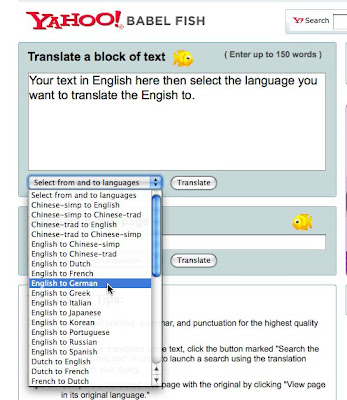
- Correct any errors in your text. Then go to http://babelfish.yahoo.com/ here you can type in each sentence of your English text and click to translate it into your own language.

- Computer translation is not very accurate, so you will need to think about the meaning and correct the translation.
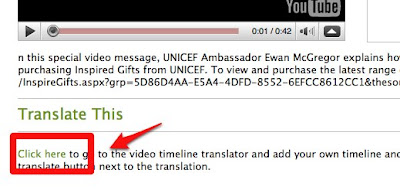
- Once you have the complete text translated, you can join the Social Translation site and add your translation to the video clip. Just click on 'Join' and create your account, then go back to the video and click on 'click here' underneath 'Translate This'.

This is a great way to practice your listening , grammar, vocabulary and translation skills.
If you want to request translations of words you don't know you can go to: http://socialtranslator.org/request and add a word or phrase.
If you enjoyed this activity you can find other videos to watch and translate here: http://socialtranslator.org/translations/videos These already have English transcription.
Here you can find more translation activities.
Related links for teachers:
- Multilingual Instant Chat Rooms
- Flickr and Wiktionary Based Image Dictionary
- Exploiting Travel Images
- Online Video: For Language Development
- Online Video: As Communication
- Free Educational TV Channels
- News Videos for EFL ESL Materials Design
- Exploiting a Video Viral
Best
Nik Peachey
Learn from English Song Lyrics
There are many great reasons to study song lyrics, not least because you enjoy listening to the song. You can learn new words from them, singing along helps with your pronunciation, reading as you listen helps with listening and reading skills.

So today's activity uses a site called Lyrics.com where you can find loads of song lyrics as well as music videos of people singing the songs.
Task:


Related links for teachers:
Nik Peachey

So today's activity uses a site called Lyrics.com where you can find loads of song lyrics as well as music videos of people singing the songs.
Task:
- Go to: http://www.lyrics.com/ think of a song in English that you like or a singer who sings in English.
- Type their name or the song name into the search field and find the song or singer.

- If you can't think of a song just select one of the popular ones from the home page

- You will then see the lyrics and on most songs you can also find a video. Play the video, listen and follow the lyrics.

- You can either just listen or you can try to sing along. Doing either one or both will help with your listening reading and pronunciation.
- Try to listen to a new song each day, or select one song and try to memorise the lyrics by singing along a number of times.
Related links for teachers:
- Can Music Aid Memory of Text?
- Transcribed Videos for EFL ESL
- Karaoke with a Social Network
- Another Great New Karaoke Site
- Great New Karaoke Site
- Sending Bubble Joy to your EFL / ESL Students
- 12 Second Video Clips for EFL ESL
- Great Video Commenting Tool
- Video conferencing for EFL
- Send Free Video Messages
- Create your own game
Nik Peachey
Read a Film Script for Pronunciation Practice
Reading is a great way to improve your vocabulary, but it can also be a good way to improve your pronunciation, especially if you can hear what you have to read.
 Today's activity uses the IMSDB (Internet Movie Script database) and explores how you can use film scripts as reading to improve your pronunciation.
Task:


Related links for teachers:
Nik Peachey
 Today's activity uses the IMSDB (Internet Movie Script database) and explores how you can use film scripts as reading to improve your pronunciation.
Task:
- Find a movie in English that you like and which has good dialogue. If you don't have any English movies you may be able to find some at: http://quicksilverscreen.com/
- Then go to http://www.imsdb.com/ and try to find the script.
- There are lots of scripts on the IMSDB, but also a lot of advertising so be careful where you click. You can either search for the movie you want or browse by alphabet or genre.
 Once you find the page with your movie on look for 'Read [movie name] script' and click on it. This will show you the movie script.


- Here's an example of the script for the first Shrek movie which many people may have.
 Once you find the script you want print up a few pages from it. Now find the movie and watch it. Try to follow the script and listen to the intonation of the speakers.
- Intonation is the change in pitch and it usually either falls or rises at the ends of sentences or at commas just like punctuation in writing.


- Try to mark on the script where you here the intonation rise or fall. Then try reading the script and trying to imitate the actors. try to copy their emotions and accents.
- Read along while watching the the movie. You don't have to do this for the whole film, but trying to imitate small chunks will help to develop your pronunciation and your ability to hear and understand the changes in emotion that it conveys.
Related links for teachers:
- Adding Phonetic Symbols to a Webpage
- Dictation goes Web 2.0
- Pronunciation goes 2.0
- Phonology can be fun and free
- Karaoke with a Social Network
- Artificial Intelligence Chat bots and EFL ESL
- Listen and Write the News
- Listen to and Download Texts
- Subtitling your video clips
Nik Peachey
A Virtual Job Interview
Doing a job interview can be a very stressful experience, especially if you have to do it in another language. That's why it's good to get as much practice as possible and have a chance to try different answers to common interview questions.
 Today's activity gives you the chance to be interviewed, try different answers and improve your listening and reading skills. You'll also get some good interview tips too.
Task:


Okay you are ready now, so start by watching the video below. Good luck and make sure you answer all the questions.
I hope you enjoy this activity. Here you can find more Business English Activities.
Related links for teachers:
Nik Peachey
 Today's activity gives you the chance to be interviewed, try different answers and improve your listening and reading skills. You'll also get some good interview tips too.
Task:
- In a moment you will be able to try the interview. Here is what you will need to do. Click and watch the video introduction.
- Then click 'Start' and watch the video for the first question.
- Select what you think is the best answers.

- Once you have chosen your answer you will get a score.
- You can also get advice on how to answer the question by clicking on 'See our advice on how best to answer this questions'

Okay you are ready now, so start by watching the video below. Good luck and make sure you answer all the questions.

I hope you enjoy this activity. Here you can find more Business English Activities.
Related links for teachers:
- Survey Creation Tool for Students
- Education for the Global Economy
- Tackling political issues
- Video debating website
- Express Your Opinions
- Playing the Stock Market
- Advertisement Project
- Using 'How to' videos
- Create an Online CV in English
- Multimedia Business Simulation
Nik Peachey
Develop Your Marketing Vocabulary
For people who want to use English within their profession, it is becoming increasingly important to be able to develop your English within specific work related topics. So in today's activity we are going to look at how you can do that.
Today we will be looking at how you can develop you listening and vocabulary knowledge of marketing and particularly online marketing. We will be using a listening and script from the Double Click website as well as some web based tools to help you learn, record and remember new words.
Task:
Related links for teachers:
Nik Peachey

Today we will be looking at how you can develop you listening and vocabulary knowledge of marketing and particularly online marketing. We will be using a listening and script from the Double Click website as well as some web based tools to help you learn, record and remember new words.
Task:
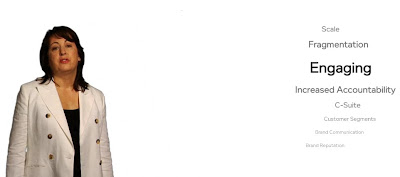
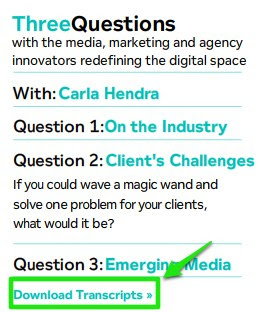
- Go to: http://www.doubleclick.com/nervecenter/ Here you will see an image of Carl Hendra. If you click on one of the topic areas on the left hand side menu you will hear her talking about those marketing topics.
- As you listen you will see keywords on the right of the screen. Listen and try to understand what you can.
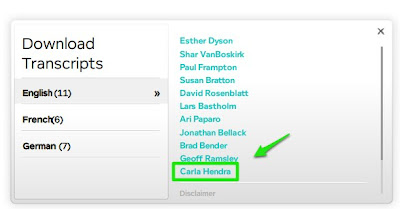
- Once you have listened once download the tapescript and listen again. This time you can follow with the script as you listen.

- To download the script you will need to click on 'Download Transcript' and then 'Carla Hendra'

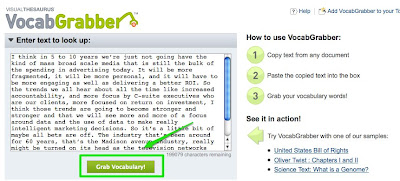
- Once you have done this, copy the first section of the script and go to the VocabGrabber website.
- Paste the text from the script into the field and click on 'Grab Vocabulary'.

- This will produce a 'word cloud' of the words in the text.
 Now you can click on each of the words to get a definition of the word and some information about related words. You can also see examples of the words in use. If you want to be sure to remember these words you could use Wordie to create a word list. There are some instructions on how to do this in the List Your Favourite Words activity.
- Lastly, listen through to Carla Hendra talking again without the script and see how much you remember. Write a summary of the main parts of the talk using FutureMe and send it to yourself so that you receive it in two weeks time along with the link to the DoubleClick website.

 Then you can check your notes and listen again. This will help you to see how much you remember and refresh your memory of the vocabulary.

Related links for teachers:
- Multimedia Business Simulation
- Playing the Stock Market
- Advertisement Project
- Using 'How to' videos
- Create an Online CV in English
- News Videos for EFL ESL Materials Design
- Subtitling your video clips
- Transcribed Videos for EFL ESLUsing Product Reviews
- Iconic teen video
Nik Peachey
Subscribe to:
Posts (Atom)